Powerful Cordless Air Duster: Clean Dust Fast, No Cans
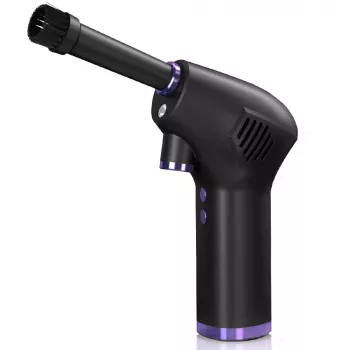
Powerful Cordless Air Duster: Fast, Clean Dust Removal Without Disposable Cans
A cordless air duster clears dust from electronics, keyboards, vents, and tight corners using a focused stream of air—without the ongoing cost and waste of disposable compressed-air cans. It’s a practical tool for routine upkeep at home, in an office, or around a hobby bench, especially when dust buildup can affect cooling, cleanliness, and day-to-day comfort.
What a cordless air duster does (and what it doesn’t)
A cordless air duster is designed to move loose, dry debris out of places that are hard to reach with wipes or brushes. It shines when you need targeted airflow in narrow gaps.
- Blows loose dust and debris out of crevices: keyboards, PC cases, console vents, camera bags, car interiors, and small appliances.
- Works best on dry, loose particles; stuck-on grime still needs gentle wiping with a microfiber cloth or an appropriate cleaner.
- Can reduce reliance on single-use compressed-air cans for routine cleaning tasks.
What it doesn’t do: it won’t sanitize surfaces, dissolve grease, or remove sticky residue by itself. Think of it as the “first pass” that dislodges debris so you can wipe it away quickly.
Why many people switch from canned air to rechargeable dusters
Disposable cans are convenient in a pinch, but frequent cleanups can become frustrating—especially when airflow weakens, the can chills, or you run out mid-task. Rechargeable dusters keep the process predictable for regular maintenance.
| Aspect | Cordless air duster | Disposable canned air |
|---|---|---|
| Ongoing cost | One-time purchase plus charging electricity | Repeated purchases over time |
| Performance over time | Typically steady output while battery lasts | Can weaken as can empties or chills |
| Waste | Minimal packaging after purchase | Empty cans to dispose/recycle |
| Convenience | Recharge and reuse | Must keep spare cans available |
| Best use | Regular home/office maintenance | Occasional cleaning or travel emergencies |
For anyone who cleans a desk setup weekly, maintains multiple devices, or deals with pet hair and lint, a cordless option is often easier to keep in rotation than remembering to buy more cans.
Best everyday uses around the home, office, and car
Dust hides where cloth can’t reach and where brushes sometimes just smear debris around. A strong burst of air can lift it out so you can capture it with a quick wipe.
- Desk setup: keyboards, mice, USB hubs, speaker grilles, and cable-management trays.
- PCs and gaming consoles: dusting fan intakes, heatsinks, case filters, and vent channels (with proper precautions).
- Home appliances: air-purifier prefilters, vacuum attachments, dehumidifier grilles, and vent covers.
- Car interior: dashboard seams, seat rails, cup holders, and air vents (follow up with a soft brush if needed).
- Hobby and workshop: sawdust in tool cases, 3D printer enclosures, or small crevices where brushes can’t reach.
A helpful rhythm is “blow, then capture”: aim airflow to push dust out and away from the device, then wipe or vacuum the loosened material so it doesn’t resettle on nearby surfaces.
How to use an air duster safely on electronics
Air cleaning is simple, but electronics benefit from a little control and patience. The goal is to move dust out, not drive it deeper into ports or spin components faster than they were designed to go.
If you’re cleaning an open PC case, consider moving it to a well-ventilated area first. For safety guidance around compressed air in workplaces, OSHA’s notes are worth reviewing: OSHA — Compressed Air for Cleaning.
Keeping dust from coming back: quick routines that work
Keeping gear and cables organized also makes cleaning faster because fewer objects trap dust. If your space tends to collect clutter that makes wipe-downs feel like a project, a simple plan can help: One Room, Real Progress: A Simple Step-by-Step Guide for Stress-Free Home Organization.
Battery and storage tips for cordless tools
For households that rotate between work-from-home, school devices, and gaming setups, a small “maintenance station” (microfiber cloths, a soft brush, and a duster) keeps everything in one place. If you’re rearranging a small room to make that station fit, Maximize Function, Minimize Clutter | Multifunctional Room Layouts eBook can help map out workable zones.
When a powerful cordless air duster is the right pick
And when devices eventually reach end of life, responsible recycling matters—especially for electronics: U.S. EPA — Electronics Donation and Recycling.
Product spotlight: Powerful Cordless Air Duster
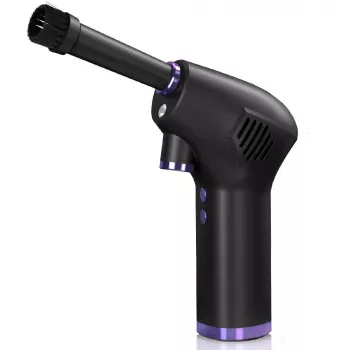
Powerful Cordless Air Duster is a rechargeable option designed for routine dust removal across electronics, home surfaces, and hard-to-reach areas. It’s a practical everyday maintenance tool for clearing vent channels, lifting debris from keyboards, and helping reduce the dust buildup that can impact cooling and cleanliness over time.
FAQ
Can a cordless air duster damage a PC or console?
It can if used carelessly. Power the device off, unplug it, hold fans still to prevent overspinning, use short bursts, and avoid blasting dust deeper into ports or heatsinks.
Is a cordless air duster better than canned air for keyboards?
Often yes for regular upkeep because airflow stays more consistent and you won’t get the cold aerosol discharge that can happen with cans. Wipe away loosened dust afterward so it doesn’t settle back into the keys.
How often should vents and filters be dusted?
For high-use setups, light maintenance weekly or every other week helps prevent buildup. Plan deeper cleaning monthly for PC case filters and intake areas, and increase frequency if you have pets or higher indoor dust.


Leave a comment