500W Portable Power Station: AC, USB & Jump-Start Guide
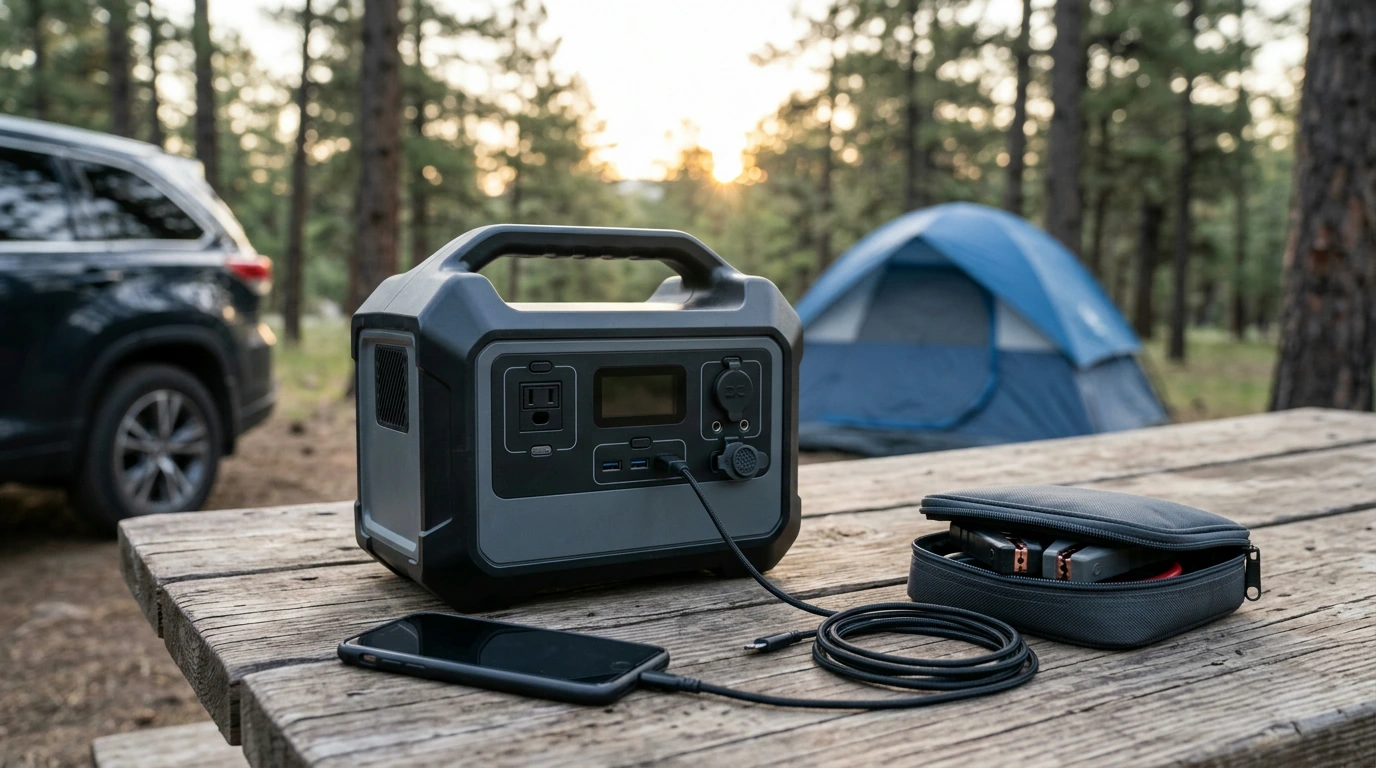
A portable power station can make a campsite, a power outage, or a roadside stop easier to manage—but only when its connections match the job. Our 500W model brings together AC and DC outputs, Type-C and USB charging, and car jump-start capability. The useful question is not simply “What can it power?” It is “Which output does this device need, and for how long?”
Put the Right Output to Work
Start with the device you want to use. AC is for compatible equipment with a standard plug. A DC output serves equipment designed for a matching DC connection. Type-C and USB are convenient for compatible phones and other small electronics. The jump-start connection has a separate purpose: helping start a compatible vehicle when used according to the supplied instructions.
Before connecting anything, read the device’s input label and identify its connector and power requirements. A station’s 500W designation does not tell you the individual rating of every port. It also does not settle whether a device’s startup demand, voltage, or plug is compatible.
| Connection | Useful for | Check before use |
|---|---|---|
| AC | Compatible plug-in equipment | The device’s wattage and the station’s AC rating |
| DC | Equipment with a matching DC input | Connector, voltage, and polarity |
| Type-C and USB | Compatible small electronics | Cable fit and charging requirements |
| Jump-start connection | A compatible vehicle battery | Vehicle requirements and the supplied jump-start instructions |
Build a Practical Backup Plan
During an outage, treat a portable station as a way to keep selected essentials available, not as a replacement for household power. Make a short priority list before you need it: perhaps a phone, a light, and another compatible device you rely on. Then note each item’s power needs and how long you expect to use it.
To estimate runtime, compare those needs with the station’s stated battery capacity, allowing for energy lost during conversion and charging. The result is a planning estimate, not a guaranteed run time. Using several outputs at once draws from the same battery, so decide which devices matter most if the outage lasts longer than expected.
Charge the station before a forecast storm or trip. If you keep it stored for emergencies, check its charge periodically and follow the manual’s storage and recharging directions. For a broader household plan—including lighting, communications, and food safety—use Ready.gov’s power outage guidance alongside your equipment instructions.
Take It From the Campsite to the Car
Pack for the devices you will actually use. Bring their required charging cables and any compatible connectors, then keep the station where you can reach it without unpacking your entire vehicle or campsite. Protect the ports and cable ends from moisture, dirt, and impact. A small cable pouch can prevent a missing cord from making an otherwise useful station unavailable.
Car jump-start capability adds another layer of backup, but it is not a reason to skip preparation. Confirm your vehicle and battery meet the product’s requirements before an emergency, and keep the specified jump-start accessories with the station. When the time comes, follow the supplied connection and starting sequence rather than improvising.
If a battery appears damaged, the location is unsafe, or the vehicle does not start as directed, stop and arrange roadside assistance. A jump-start feature cannot diagnose or repair a vehicle fault.
Choose Loads Before You Switch On
A quick sequence can prevent most connection mistakes:
- Identify the device’s input requirements, including its connector and running power.
- Choose the station output designed for that connection.
- Confirm the applicable output rating and, where relevant, the device’s startup demand.
- Account for anything already connected before adding another load.
Higher-power appliances may drain a battery quickly or exceed an output’s limit, even when their plug fits. Do not assume that a device will work based on the station’s headline wattage alone. If you are comparing options, our 500W portable power station is the model discussed here; review its current specifications and included accessories against your device list before purchase.
It can also help to give your backup gear a dedicated place at home. If cables, instructions, and emergency supplies tend to get scattered, our One Room, Real Progress organization guide offers a way to make that storage area easier to maintain. Keep the station itself stored as its manual directs.
Use and Store It Safely
The product manual should be your reference for charging, operating temperatures, storage, and jump-start steps. Keep ventilation clear while the station is in use, and keep ports dry. Inspect cables and connectors before plugging them in; do not use damaged accessories.
Preparation makes the station more useful than a last-minute guess. Match your devices to the correct outputs, keep the necessary cables together, and revisit your priority list when your equipment changes. That way, whether you are packing for a trip or preparing for an interruption at home, you know what you intend to power and what limits to respect.
FAQ
Can a 500W portable power station run any device rated below 500W?
Not automatically. Check the applicable output rating, the device’s running and startup power needs, and connector compatibility.
Can the Type-C, USB, and AC outputs be used at the same time?
Consult the product instructions for simultaneous-use limits and the combined output rating before connecting multiple devices.
What should I check before using the jump-start feature?
Confirm that the vehicle and battery meet the product’s requirements, use the specified accessories, and follow the supplied connection and starting sequence.





Leave a comment