Mesh Ergonomic Office Chair: Height + 3D Armrest Guide
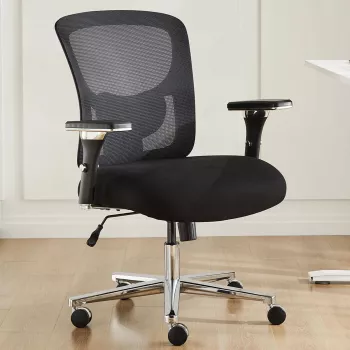
Ergonomic Mesh Backrest Office Chair with Adjustable Height and 3D Armrest
A supportive office chair can make long work sessions feel steadier and less fatiguing—especially in a small home-office where you’re switching between typing, calls, and quick breaks. An ergonomic mesh-back chair focuses on breathability, posture support, and practical adjustments that help the chair adapt to different bodies and desk heights. Below is a clear guide to what matters most, how to set it up quickly, and what to check before buying.
What Makes a Mesh-Back Ergonomic Chair Feel Better Over a Full Day
Mesh-backed office chairs are popular because they tend to feel lighter and cooler than fully upholstered designs. The backrest “gives” a little under pressure, which can feel supportive without being stiff—when the tension and frame shape are done well.
- Airflow that stays consistent: A mesh backrest helps heat escape, which can feel noticeably more comfortable in warm rooms or upstairs offices.
- Steady posture support: An ergonomic backrest should follow the natural curve of the spine. The best support feels even and stable rather than forcing a rigid arch.
- Seat height as the foundation: Height changes affect your knee angle, hip comfort, and whether your feet can rest flat—small differences here can change how your back feels by the afternoon.
- Arm support that prevents “shrugging”: Multi-direction armrests let elbows stay closer to the body, which can reduce shoulder tension during keyboard and mouse work.
- Controlled movement: A chair that rolls, pivots, and turns smoothly—without wobble—makes it easier to stay supported while you transition between tasks.
Key Adjustments to Look For (and Why They Matter)
If a chair only adjusts in one way, you end up adapting your body to the chair. A better approach is the opposite: adjust the chair to match your workstation and your proportions.
- Adjustable seat height: Helps you land in a neutral sitting position—feet supported, knees comfortable, shoulders relaxed.
- 3D armrests: Typically include height plus forward/back or pivot adjustments. This is especially useful if you alternate between typing and mouse-heavy tasks.
- Back support feel: Mesh should provide gentle resistance (even support across the back) rather than feeling saggy or creating pressure points.
- Fit checks that take 10 seconds: Armrests shouldn’t push shoulders up; the seat edge shouldn’t dig in behind the knees; the backrest should meet the mid-to-upper back comfortably.
- Home-office flexibility: Adjustable components help one chair work across multiple setups—laptop stand today, monitor arm tomorrow, or a sit-stand desk used at seated height.
Adjustment checklist for desk comfort
| Chair setting | Target position | Quick self-check |
|---|---|---|
| Seat height | Feet flat, knees comfortable | Thighs supported without pressure behind knees |
| Armrest height | Elbows relaxed near sides | Shoulders stay down, wrists stay neutral |
| Armrest position (3D) | Arms aligned with keyboard/mouse | No reaching or flaring elbows outward |
| Back support contact | Support along back curve | Feels supportive without forcing a slouch or arch |
How to Set It Up in 10 Minutes
Most discomfort comes from “almost right” settings. A short setup routine can prevent hours of compensation (leaning forward, shrugging, or perching on the seat edge).
- Start with seat height: Stand in front of the chair and set the seat near knee level. Sit down, then fine-tune until your feet are flat (or supported) and your thighs feel evenly supported.
- Adjust armrests next: Raise or lower until your forearms can rest lightly while shoulders stay relaxed. Then slide/pivot the armrests so your elbows stay close to your torso when you type or use a mouse.
- Align the chair to the desk: Pull in close enough that you don’t have to reach. If you notice your head drifting forward, bring the chair closer before changing your posture.
- Use the backrest actively: Sit back so the backrest supports you while typing, reading, and on calls—avoid hovering forward for “focus.”
- Re-check after 1–2 hours: Once your body settles into work, make micro-adjustments. A quarter-inch change in armrests or seat height can be the difference between relaxed shoulders and creeping tension.
For additional workstation guidance, ergonomic references like the OSHA Computer Workstations eTool and the Mayo Clinic office ergonomics guide provide practical position benchmarks.
Who This Chair Style Works Best For
Breathability, Support, and Durability: What to Expect from Mesh
Practical Add-Ons That Improve Comfort Without Replacing the Chair
A Simple Buying Checklist for an Adjustable Desk Chair
Recommended Picks for Small Offices and Flexible Setups
- Ergonomic Mesh Backrest Office Chair with Adjustable Height and 3D Armrest
- Maximize Function, Minimize Clutter | Multifunctional Room Layouts eBook | Small Space Design Guide | Space-Saving Furniture & Smart Home Ideas
- One Room, Real Progress: A Simple Step-by-Step Guide for Stress-Free Home Organization
FAQ
How should the seat height be set for a typical desk?
Set the seat so your feet are flat on the floor (or on a footrest), knees feel comfortable, and thighs are supported without pressure behind the knees. When your arms are relaxed, your elbows should sit roughly level with the work surface.
What are 3D armrests used for?
They provide multi-direction arm support (commonly height plus forward/back or pivot) so elbows can stay close to the body. This helps keep wrists more neutral during typing and mouse use.
Is a mesh backrest good for long hours?
It can be—especially for heat management and consistent support—as long as the mesh tension and shape feel supportive rather than sagging. Proper setup and occasional posture check-ins still make a big difference over long sessions.


Leave a comment